The answer, where the problem is
You have a question. Nobody around you knows the answer. What can you do?
In the good old days you found a book and studied it. Eventually you found the answer. It could take days.
Then came the internet. You type the question into a search box and look for the right article with the right answer. Information at your fingertips — nice.
But you want more. You want to see what the answer looks like. So articles started carrying pictures, and most of us are visual learners — nicer.
And you want more again. You want to see the problem actually being solved. You want someone to talk through it, explain the reasoning, take questions. Here come YouTube and TikTok — even nicer.
Just tell me the answer
After the initial excitement, you notice something. Sometimes you just want to know what the fix is. You don’t want to spend ten minutes watching, never mind the sponsor read and the reminder to subscribe.
You are not the only one. Forum threads like this one keep appearing: “Why does everything have to be a video these days?” The person who started it found his answer in a text manual in about eight seconds, after ten minutes of video that covered things he already knew. Twenty people showed up to agree.
The most-liked reply explains why it keeps happening: creators earn from you watching, not from you finding.
So, agents
Here comes the AI chatbot, and then the AI agent. No more gambling on which link might answer you. And even “nicer” — the agent can do it for you. It sees your browser, clicks and types on your behalf, books the whole trip, edits your document, makes the purchase.
But is it nicer?
You start to worry about what it decides on your behalf. The security firm Cyera went through 7,246 publicly reported AI incidents — drawn from the AI Incident Database and OECD trackers — and verified 344 as enterprise-relevant. 188 of those were caused by an autonomous agent with no attacker anywhere in the chain. Nobody attacked anything. An agent was given a task, pursued it, and broke something on the way.
So the agents ask for your approval instead, and you get approval fatigue. You are clicking Allow on a stream of decisions you do not have time to judge. And when it finishes, you have the result but you did not learn anything. Next time, you will need it again.
So you start to dream of a buddy. Someone you can ask at the exact moment you are stuck, without leaving what you are doing — who is looking at the same screen you are, and who gets straight to the point.
You are not imagining it - we built one properly
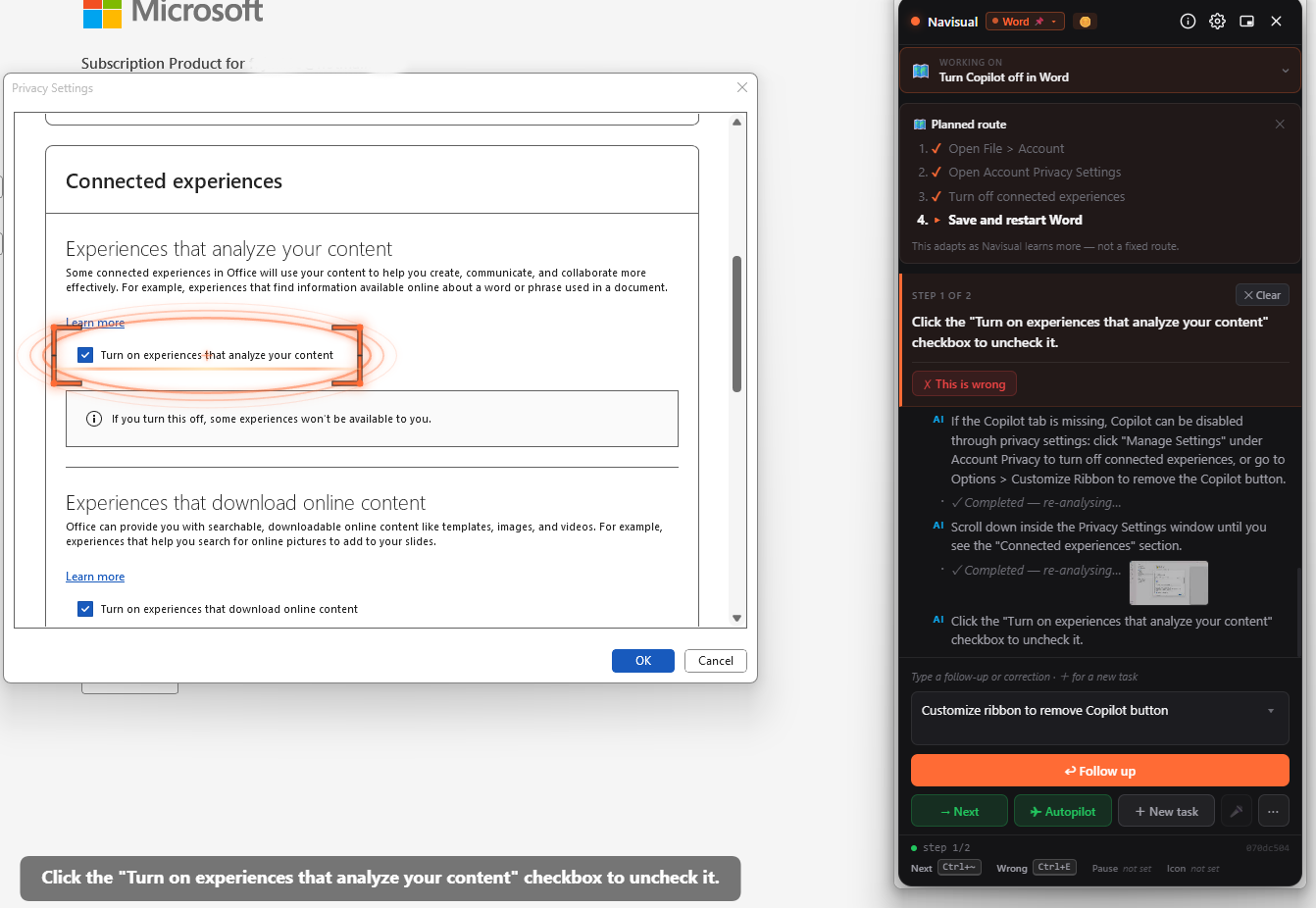
Navisual is that buddy. Ask your question without leaving what you are doing. It understands the question better because it is looking at exactly what you are looking at. It works out a plan, then walks you through each step with a pointer on the actual button and narration in text and speech. You can talk back to it, correct it, ask why. It gets you straight to the point, in a way you can see.
And it never clicks for you. You do every step yourself, which is the reason you still remember it tomorrow.
Here is what that looks like in practice.


Real ones
Both of these started as someone stuck in front of a screen, asking Navisual. They are written up step by step:
Setup OrcaSlicer with your 3D printer over Wi-Fi — almost every guide online skips one field. Leave it blank and the Device tab shows a blank 404 even though printing works fine.
No Copilot tab in Word Options? — most answers say File ▸ Options ▸ Copilot. That tab is missing in many builds of Word.
Which is the whole idea. The answer, where the problem is.
Steps like these are easier when something points at the actual control on your screen. Navisual reads what is in front of you and shows you where to click. It never clicks for you.